SupplierVault
Product

The whole life of a supplier, in one place

From the first request to the day they leave, each step is a task with an owner, a due date and a record of what happened. Features marked Professional plan or Enterprise plan come with that plan and above; your free month includes them all.

Features

Supplier onboarding

Onboard suppliers with the right checks for their tier

Choose a tier and SupplierVault sets the checks: conflict of interest, sanctions, Companies House and VAT checks with the result recorded, finance set-up, privacy and security questionnaires, code of conduct. Going live is signed off by a named person with the authority the tier needs. On the Professional plan and above, suppliers fill in their own forms through a secure portal, and Companies House, UK sanctions and Modern Slavery registry checks run in one click, with live suppliers re-checked for changes.

  • Area packs for Technology, Facilities, People and HR, Marketing and professional services (Professional plan)
  • Edit any question, rename any field, add your own forms
  • Click a task and it takes you to the form it's about
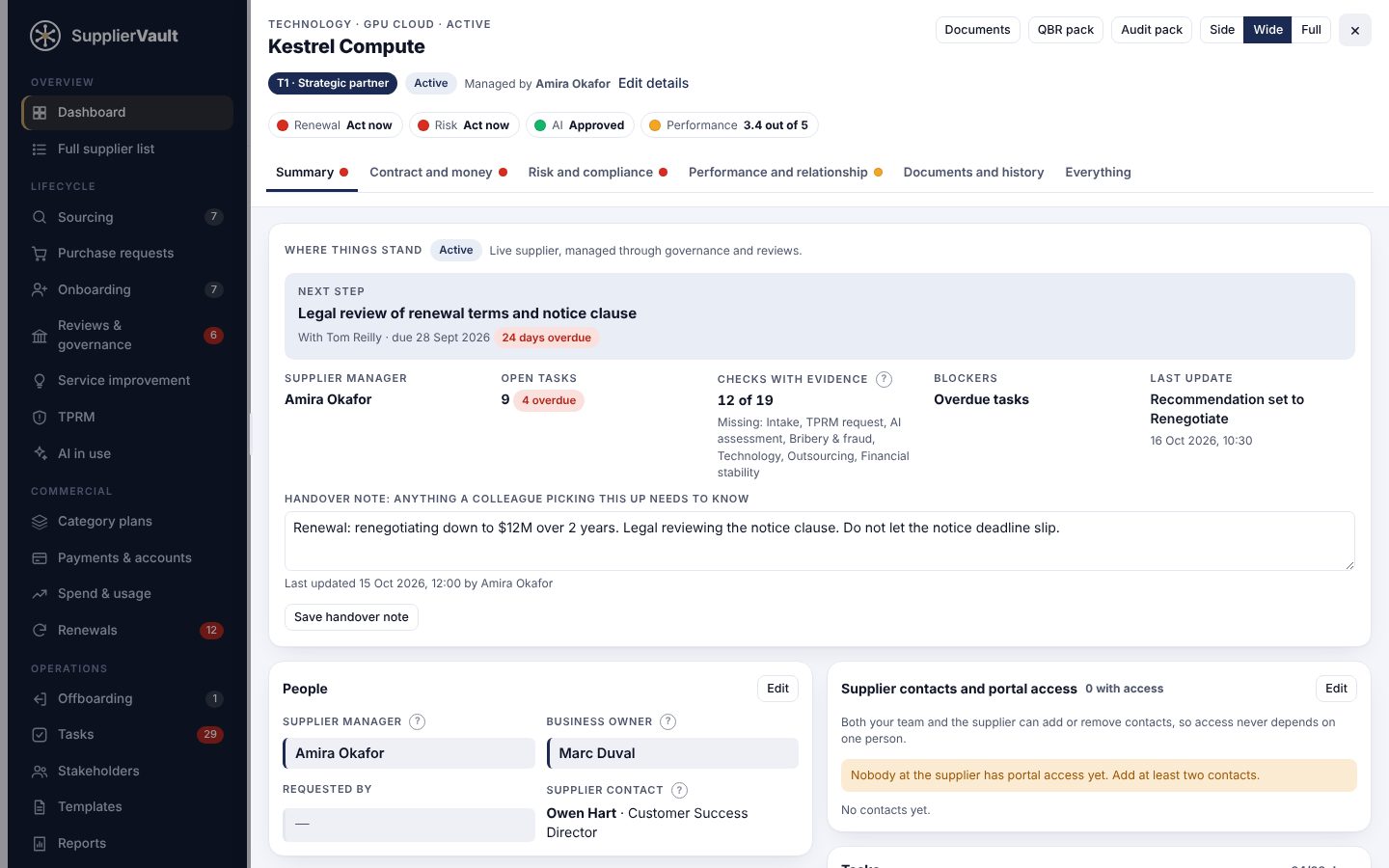
A supplier record in SupplierVault showing the next step, handover note, contract renewal dates and tier assessment
Every supplier has a next step, a handover note and the details that matter most at the top.
Contract renewals

See every renewal and notice deadline months ahead

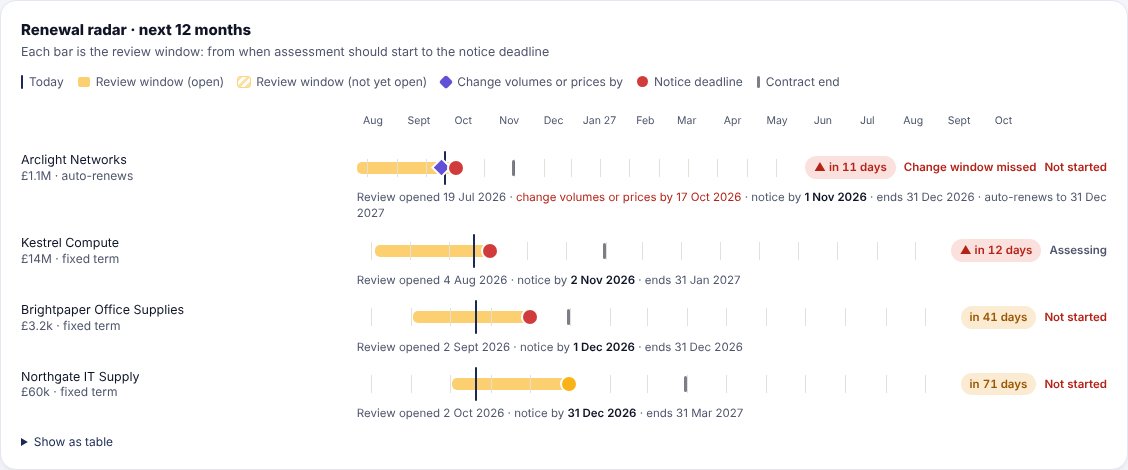
The renewal radar shows each contract's review window, the date to change volumes or prices, the notice deadline and the end date. When a decision is due, the contract moves to the top of the supplier's record.

  • Separate deadlines for price changes and cancellation notice
  • Enter the term, notice period and renewal date, and every deadline is worked out for you
  • Contract reviews on a schedule set by tier
The renewal radar showing review windows and notice deadlines for each contract over the next 12 months
Purchase requests

One-off purchases, checked and signed off before the order

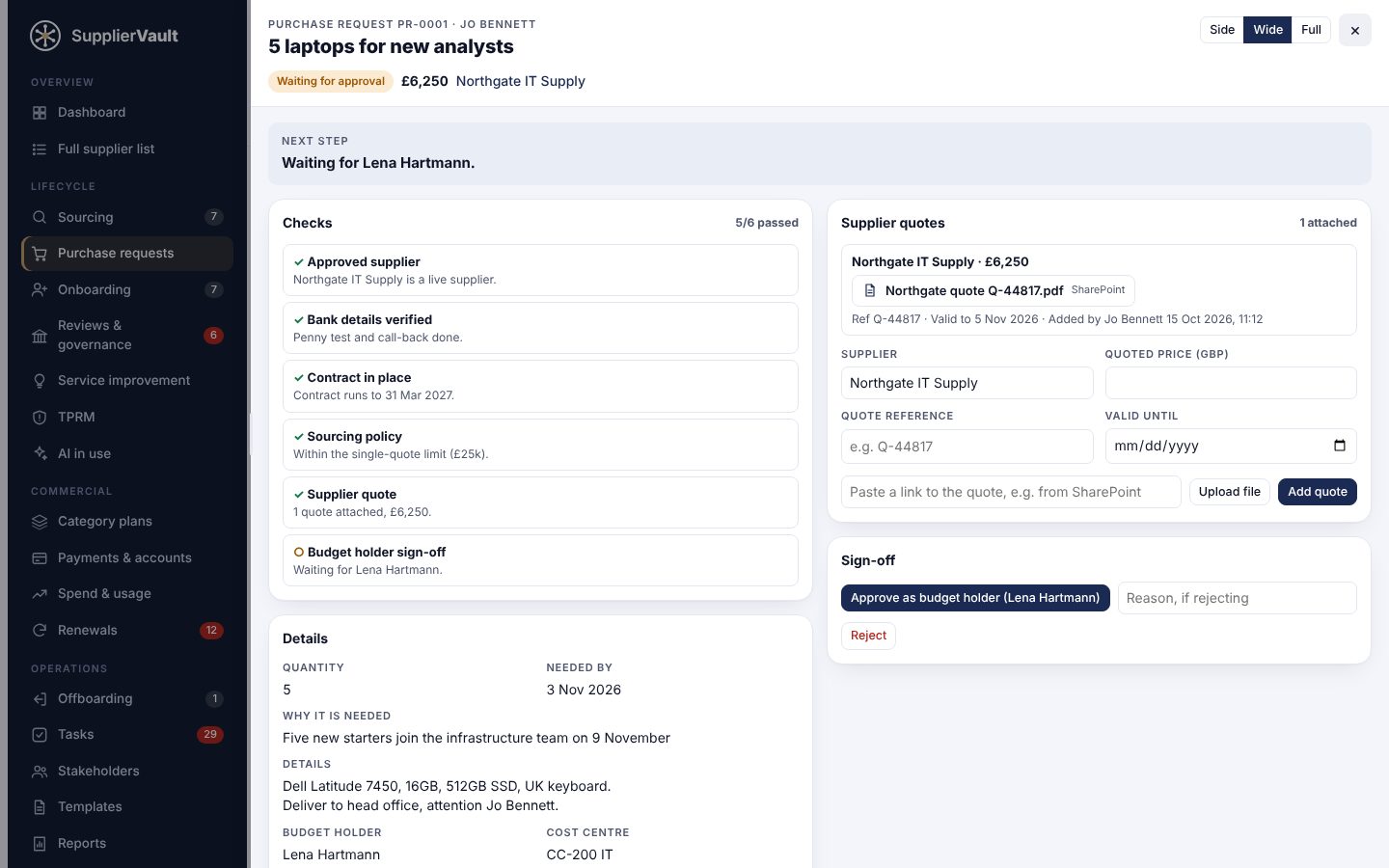
Anyone in the business can ask for something, like five laptops from your hardware supplier. SupplierVault checks the supplier is approved, the bank details are verified, the contract is in date, the spend rules are met and a quote is attached. Then the budget holder signs off and a purchase order goes out.

  • Budget holders without a login can approve by email, and the email is kept as evidence
  • Away? Hand your sign-offs to a colleague for set dates, recorded as given on your behalf
  • Keep using ServiceNow or Jira and add the ticket number
  • Quotes from SharePoint links or uploads
A purchase request for 5 laptops showing passed checks and a supplier quote linked from SharePoint
Bank detail fraud checks

Stop change-of-bank-details fraud before money leaves

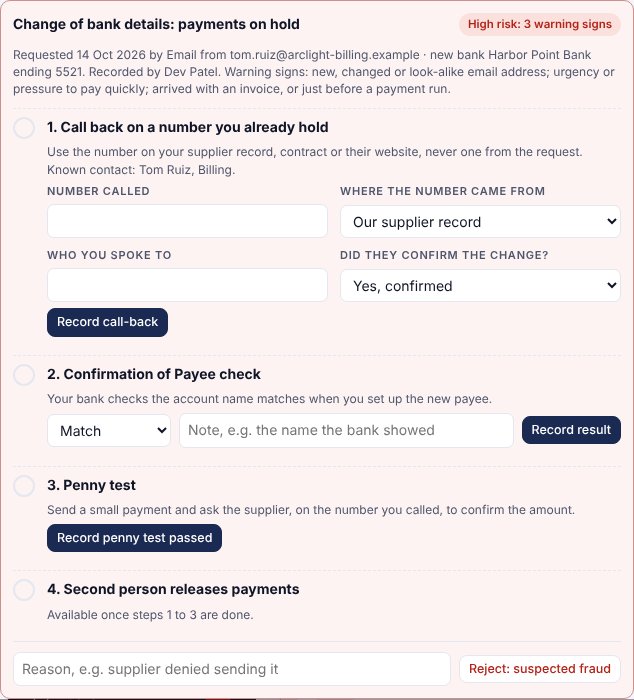
As soon as you log a supplier's request to change bank details, its invoices are put on hold. Your team records the warning signs, calls back on a number you already hold, checks Confirmation of Payee and runs a penny test. A second person then releases the payments.

  • Blocks release if the same person did the call-back
  • Choose who may release, with cover when they're away
  • Suspected fraud keeps the original details and records why
  • Every change is in the audit pack
A change of bank details request with payments on hold and three verification steps completed
Supplier risk and tiering

Tiers that decide the workflow, not just a label

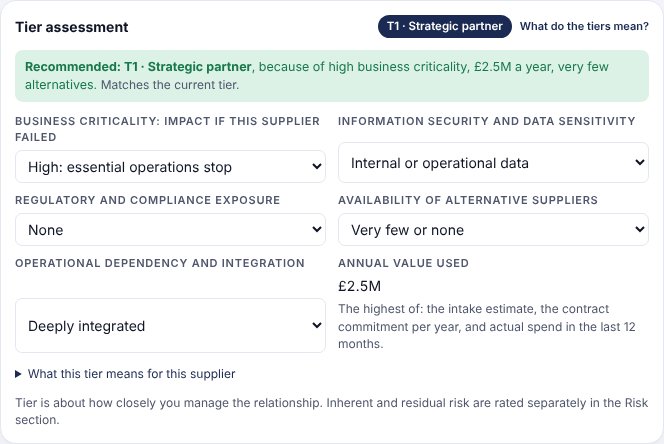
SupplierVault recommends a tier from value, business criticality, data sensitivity, regulatory exposure, alternatives and integration, explains why, and flags when a supplier should move up or down. Inherent and residual risk are rated separately. Third-party risk reviews come with the Professional plan and above.

  • A £5,000 supplier holding sensitive data gets more oversight than a £100,000 commodity supplier
  • Risk reassessments due on the cycle each tier needs
  • Cyber Essentials and certificate expiry tracked
A tier assessment recommending moving a supplier to T1 Strategic partner, with the reasons
Performance and spend

Know what you spend and whether it's working

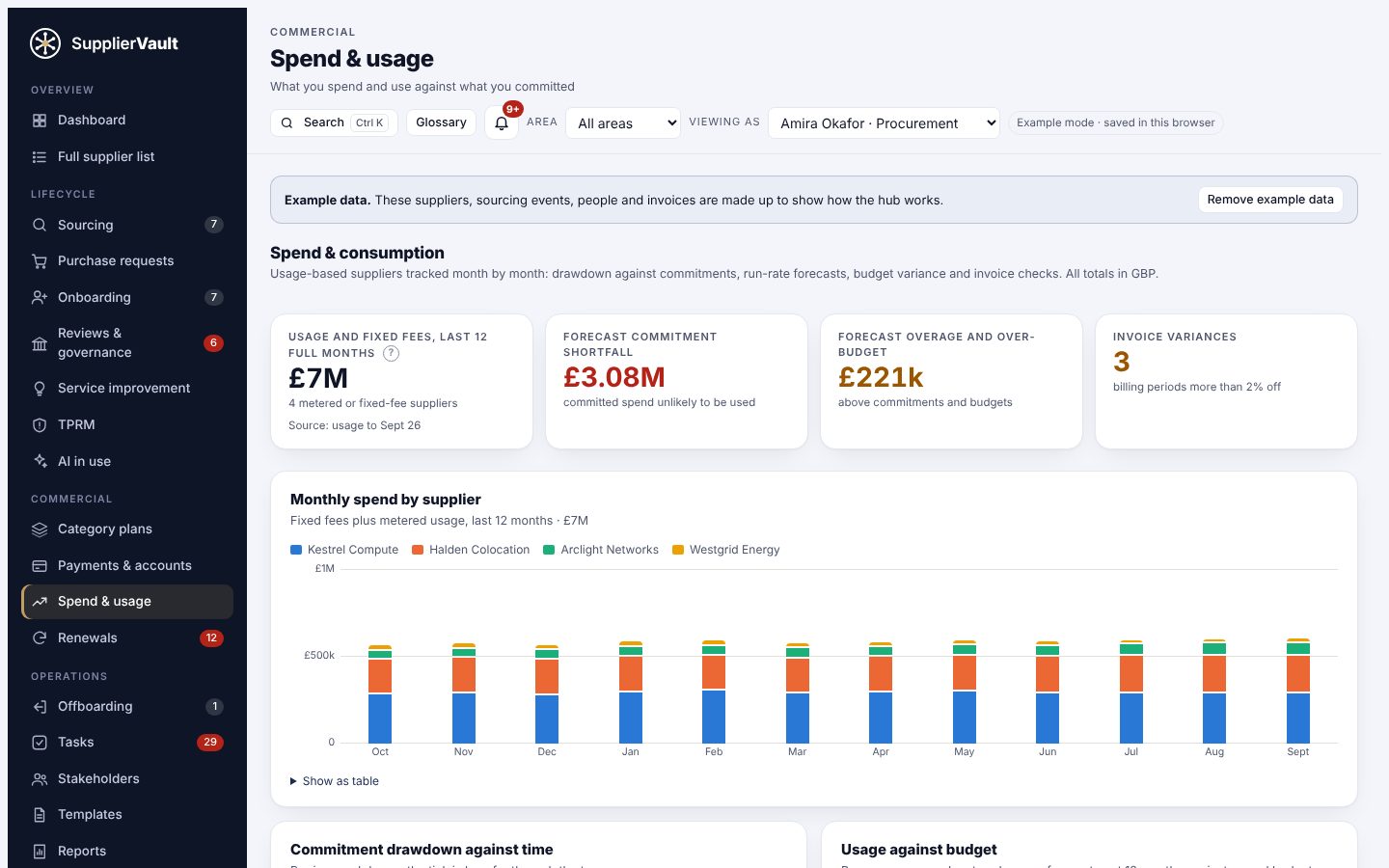
See actual spend from invoices and orders, how much of what you reserve is used, and how each supplier is performing. On the Professional plan and above, log improvements from reviews and incidents, and follow them through to a checked benefit.

  • Actual spend or contract commitments, by area and supplier
  • Quarterly scorecards, service reviews and escalations (Professional plan)
  • Verified improvement savings added to the savings register in one click (Professional plan)
The dashboard showing actual spend by area, currency exposure and suppliers by residual risk
Audit trail and reports

Hand your auditor a complete record

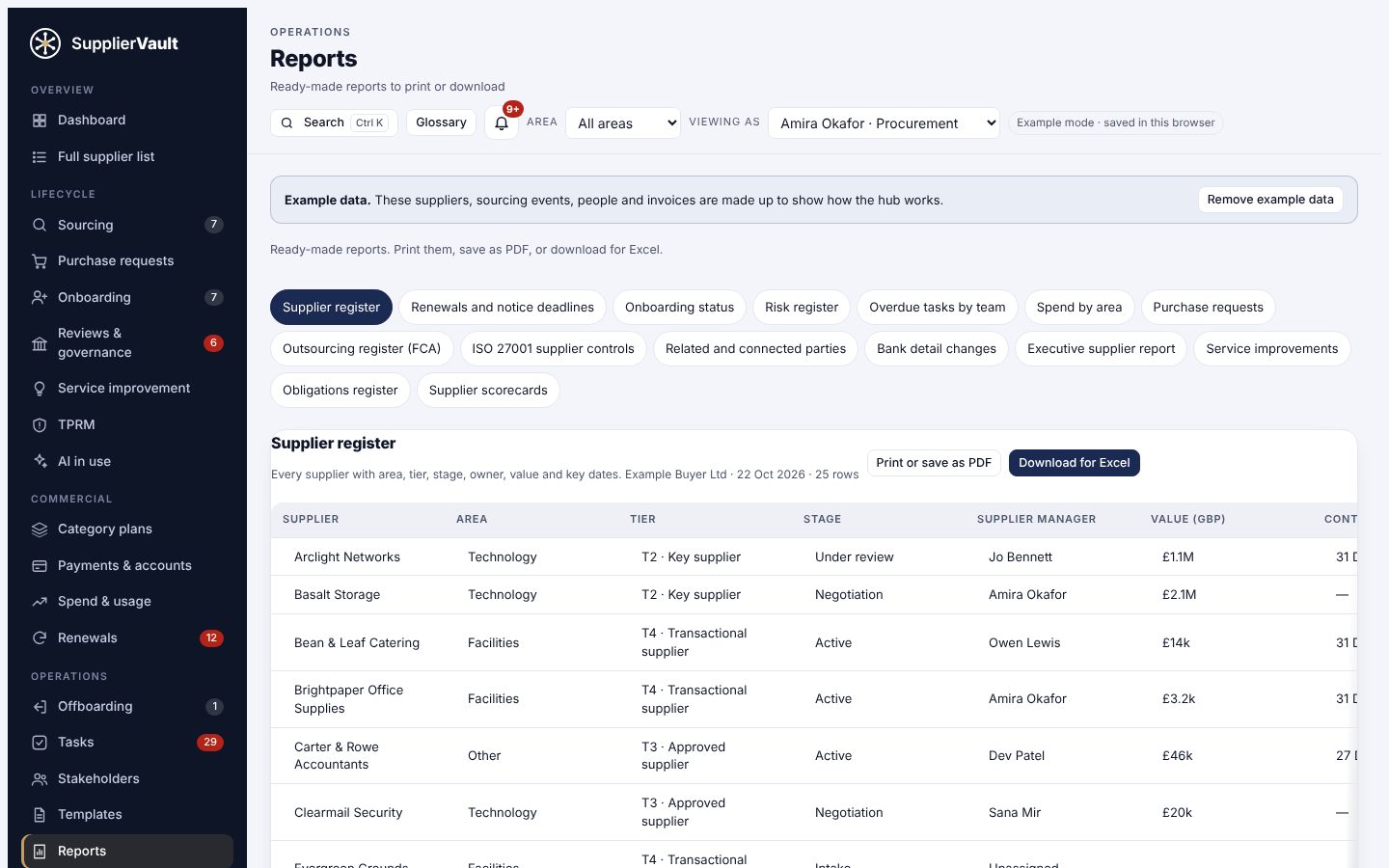
Every form decision, approval, sign-off, task outcome and change is recorded with the person and the time. Download an audit pack for any supplier, or run a ready-made report and export it for Excel.

  • ISO 27001 supplier controls, with gaps marked
  • FCA outsourcing register and related party register
  • Bank detail changes, renewals, risk and an executive report
The ISO 27001 supplier controls report listing each supplier's checks met and gaps
Supplier portal and e-signatures Professional plan

Suppliers do their own paperwork, through one secure link

Send a personal link and the supplier fills in their details, payment set-up (never the full account number), insurance and questionnaires, then signs your code of conduct and contracts online. Your team reviews and approves, and every signature is stored with a receipt.

  • Links expire and can be revoked at any time
  • A free supplier account shows suppliers every request in one place, and lets them send renewed certificates before they expire
  • Both sides add or remove contacts, so access never depends on one person
  • One-click checks against Companies House, the UK Sanctions List and the Modern Slavery statement registry
Sourcing and quotes Professional plan

Run a tender, or just compare three quotes properly

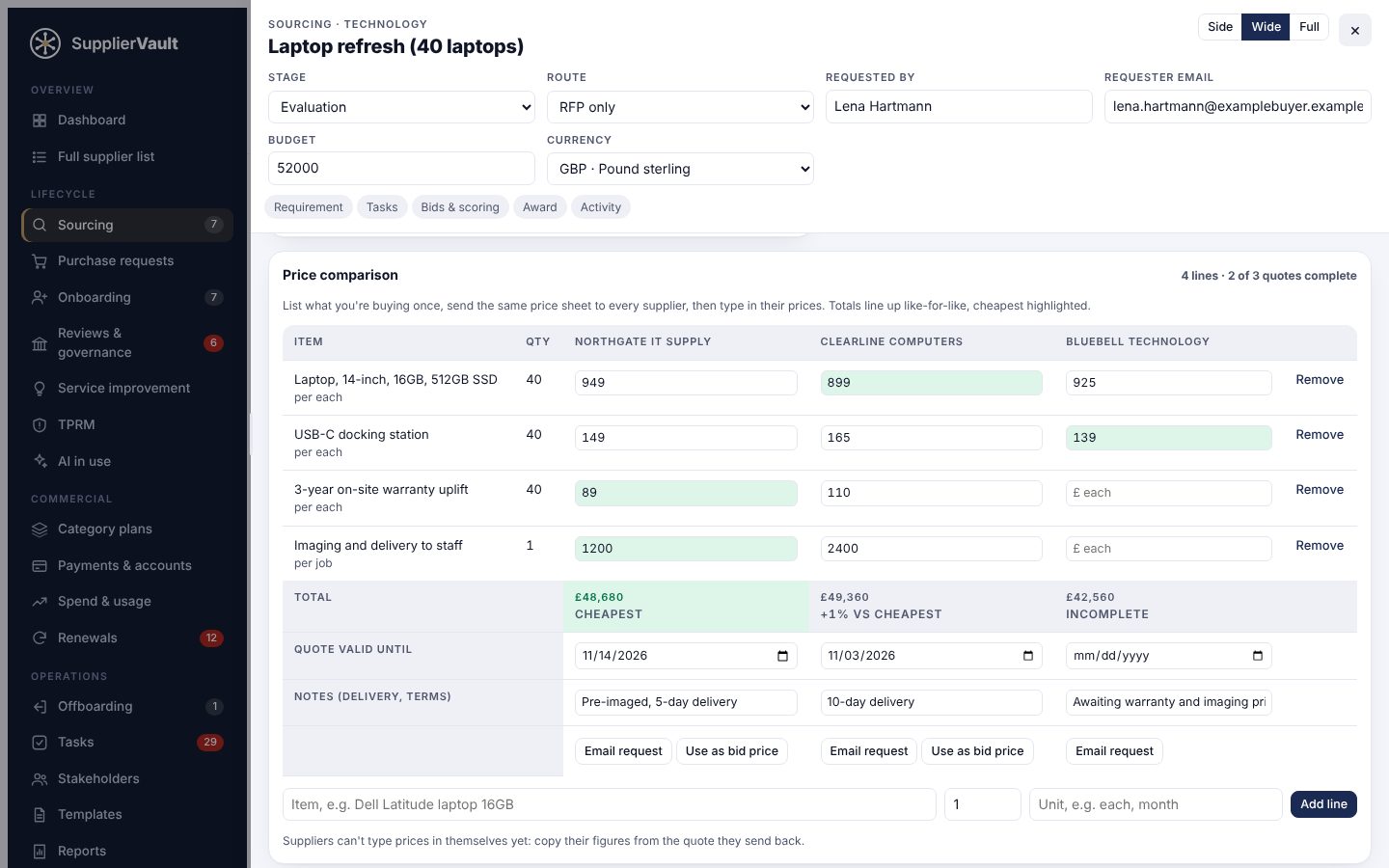
Set requirements and must-haves, invite suppliers and score bids against weighted criteria. For everyday buying, list what you need once, send the same price sheet to each supplier and see every quote side by side, cheapest highlighted.

  • Like-for-like totals, with incomplete quotes marked
  • Award straight into onboarding
  • Savings recorded against the budget
A price comparison of three laptop quotes, with the cheapest line prices and the cheapest total highlighted
Category plans Professional plan

One page per area for whoever manages the category

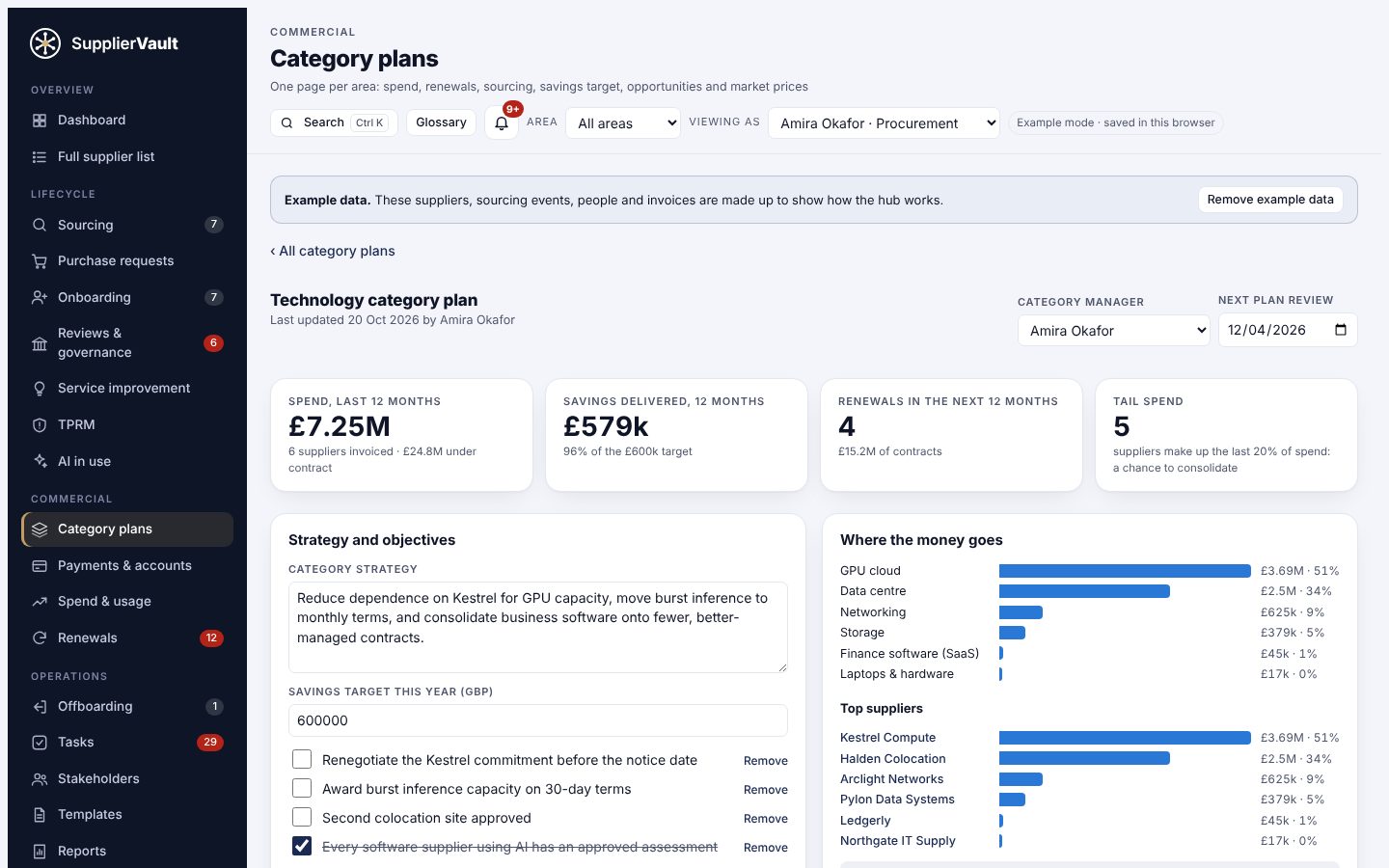
Spend by sub-category and supplier, contracts coming up for renewal, sourcing under way and savings against target, with the plan, objectives and risks alongside. Turn an opportunity into a sourcing event in one click.

  • Tail spend flagged as a chance to consolidate
  • Suppliers positioned by spend impact and supply risk
  • Plan review dates, flagged when a review is due
A category plan for Technology showing spend, savings against target, renewals and tail spend
Reviews, obligations and exit Professional plan

Manage the relationship, not just the paperwork

Quarterly scorecards and stakeholder surveys, review meetings with actions and decisions, both sides' contract obligations with due dates, and improvement ideas followed through to a checked benefit. When a supplier leaves, an offboarding checklist covers notice, data return, access and final payments. Contract obligations and the offboarding checklist are on every plan.

  • QBR pack in one click
  • Escalations on a clock
  • Reviews and tasks routed to the right person in each area
AI governance Professional plan

Know which suppliers use AI with your data

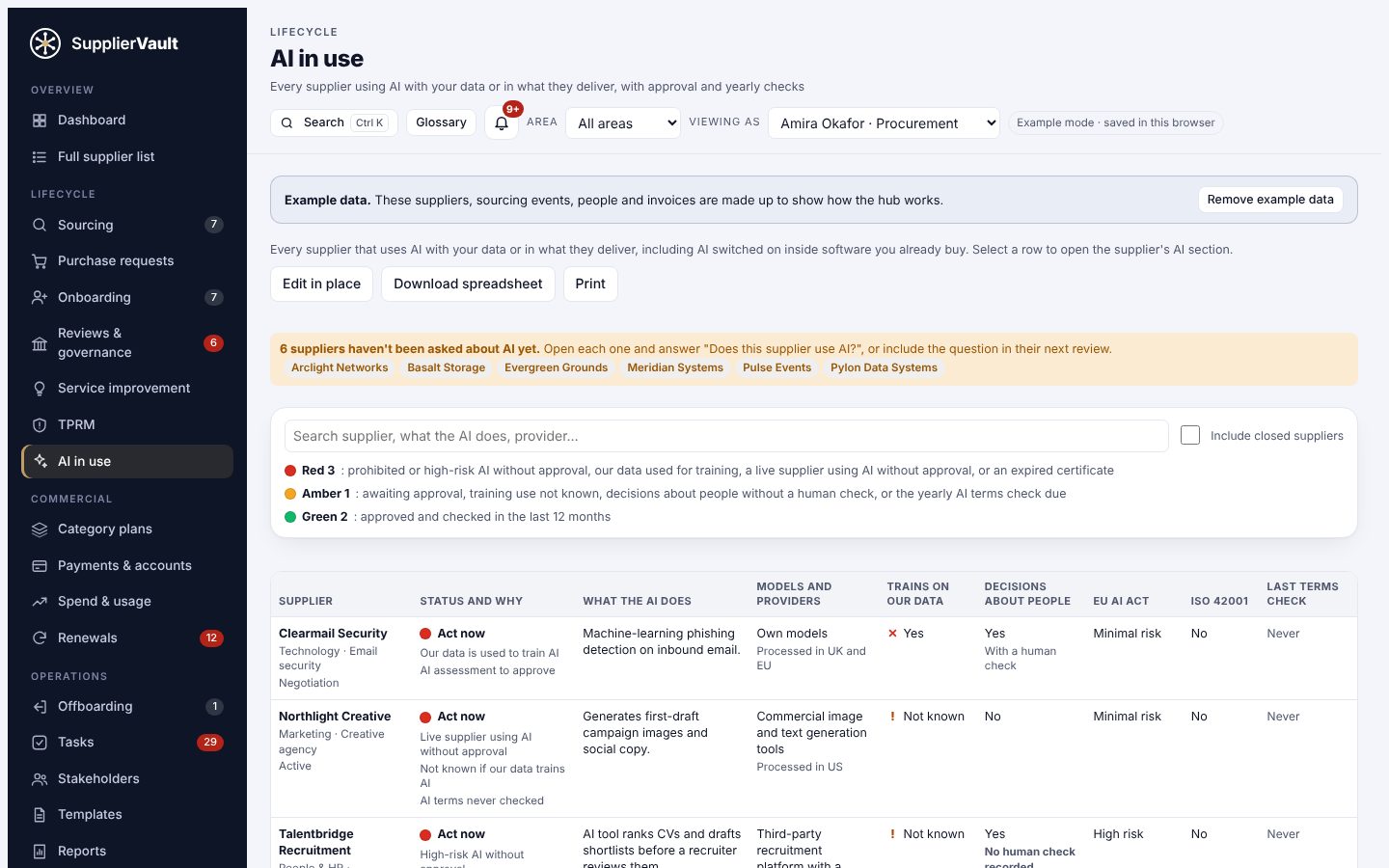
Ask every supplier whether they use AI, record what it does, where data goes and whether it trains on your data, then have it approved. Suppliers using AI without approval are flagged in red on your Dashboard's attention list.

  • AI in use register for every supplier
  • Yearly AI terms check
  • AI clauses checklist for your contracts

Working towards ISO/IEC 42001? Switch on the optional AI management module to keep your AI register, AI risk and impact assessments, AI policy and a Statement of Applicability for all 38 Annex A controls in one place, with internal audits, management reviews and an evidence pack for your auditor. What ISO/IEC 42001 asks for

The AI in use register listing suppliers that use AI, with approval status and why
Fits how you already work

Calendar, spreadsheets, accounting software and an API

Notice deadlines and obligations appear in your Outlook or Google calendar. Import your supplier list from a spreadsheet, export any report for Excel, and connect other systems through the API on the Enterprise plan. SupplierVault can also connect to Xero, QuickBooks Online, Sage Accounting, Sage 200 or Microsoft Dynamics 365 Business Central. You connect your own account, and supplier bills and payments are then read in every morning, read only, with bills held when bank details aren't verified. These connections are built and are being switched on now: ask us and we'll tell you when yours is ready. Until then, you can enter invoices yourself or import them from a spreadsheet.

  • Keep using ServiceNow or Jira ticket numbers
  • Read and write API keys you control (Enterprise plan)
  • Accounting connections switched on for you on request; Sage 200 and Business Central are the newest, so we set those up with you
  • Read only: never writes to your accounts or reads bank details
  • UK database hosting
Teams, roles and groups

The right access for everyone, and cover when they're away

Unlimited users on every plan. Make your own roles, such as Finance or Requester, by choosing what each may change. Once Microsoft or Google sign-in is switched on for you (ask us), lock company sign-in to your own Microsoft tenant or Google Workspace domain, and let Microsoft Entra ID or Okta add starters and remove leavers automatically. When someone is away, a colleague gives their sign-offs on their behalf: purchase requests, supplier go-live and releasing payments after a change of bank details, with one person still never signing two steps. On the Enterprise plan, groups of companies and multi-academy trusts see a read-only summary across every member.

  • Custom roles for suppliers, payments, purchase requests, sourcing, stakeholders and set-up
  • Time-limited auditor access with an access log
  • Automatic user syncing from Microsoft Entra ID or Okta (Enterprise plan)
  • Group view of shared suppliers and renewals (Enterprise plan)
AI assistant

Ask what needs doing, in plain English

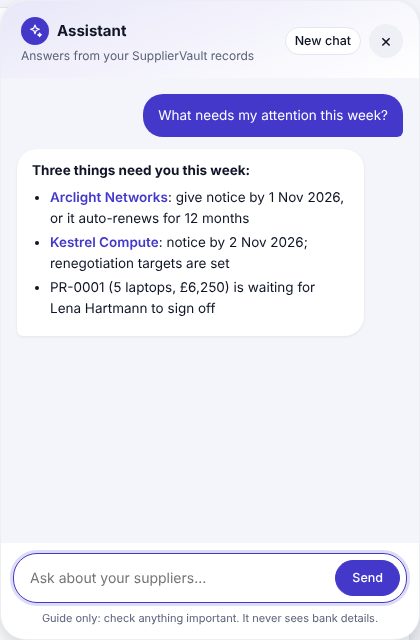
Ask which contracts need notice, what's outstanding for a supplier or who should move tier. The assistant answers from your own records, drafts renewal and chaser emails, and fills in forms for you to check. It can't approve anything, and it never sees bank details.

  • Links straight to the supplier it's talking about
  • Drafts you check before anything is saved or sent
  • Optional for each organisation, with a fair-use monthly allowance
The SupplierVault assistant listing three things that need attention this week

Switch on only the modules you use

The Dashboard, onboarding, tasks and stakeholders are always on. Twelve more modules, from sourcing to AI management, switch on or off in Modules & forms. Switching one off never deletes its data.

Details
Supplier tiering

Four tiers, each with its own level of oversight

Going live is signed off by a named person. The tier decides how much checking and review comes with it.

T1

Strategic partner

Critical to strategy or essential operations, hard to replace or deeply integrated.

Approval
Executive or senior leader
Risk review
Every 3 months
Contract review
Monthly
T2

Key supplier

Significant spend, operational dependency, specialist skills or material service commitments.

Approval
Senior manager
Risk review
Every 6 months
Contract review
Quarterly
T3

Approved supplier

Useful, recurring goods or services with manageable risk.

Approval
Department manager
Risk review
Yearly
Contract review
Six-monthly
T4

Transactional supplier

Low value, easily replaced, with little dependency or risk.

Approval
Supplier manager or Procurement
Risk review
When something changes
Contract review
At renewal

See it with your own suppliers